
Review the extracted structure
Start by checking the workstreams proposed from the campaign plan.
Measure / SPECIALIST APP
Turn campaign plans into visible workstreams, owners, milestones and regular progress reporting.
Track a joint PR/PA programme across media preparation, stakeholder engagement, content and measurement, with named owners and a shared view of delivery.
Explore it in a demo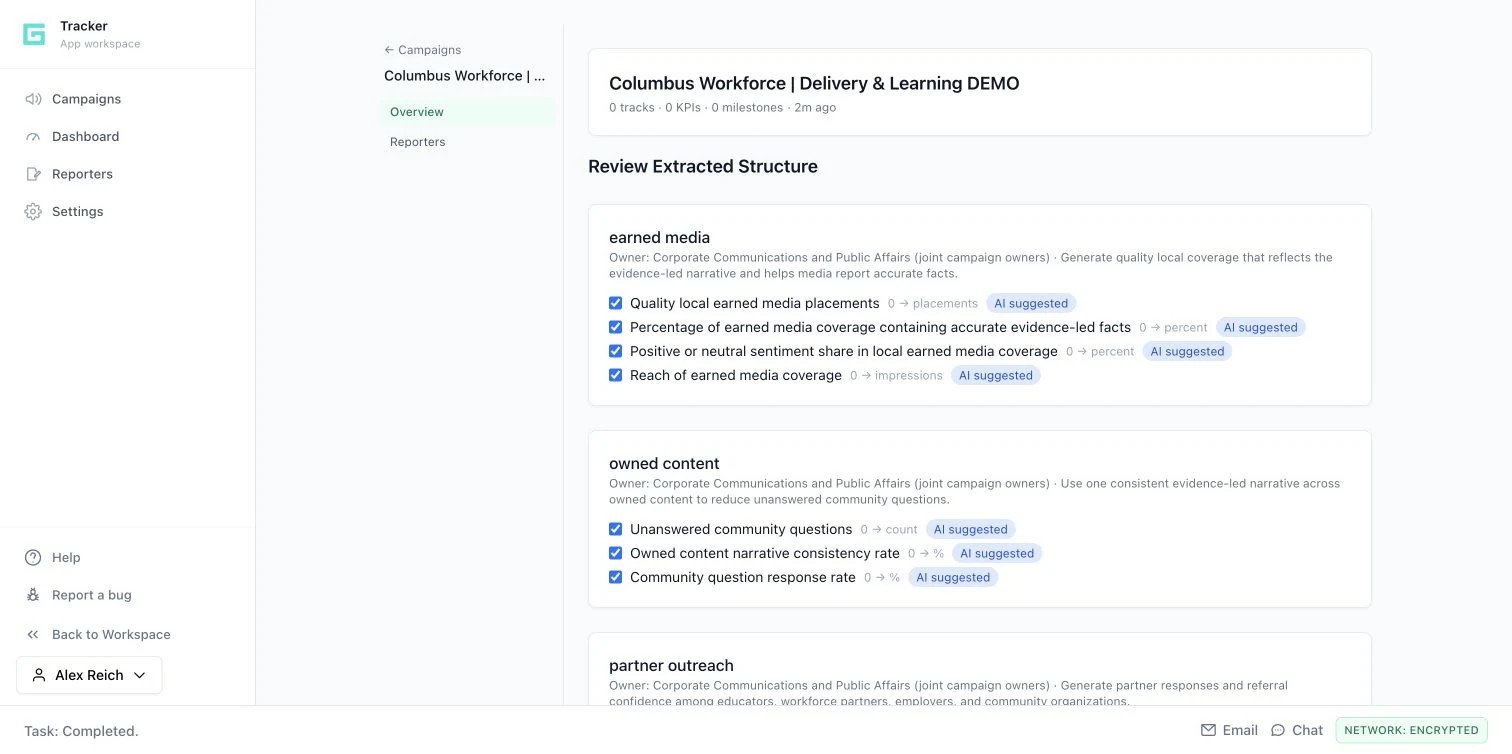
15 SECONDS / INSIDE THE WORKFLOW
Make workstreams, owners, measures and reporting concrete enough to review together.
Guided product walkthrough using actual demo screens. Silent, with on-screen explanations.
Start by checking the workstreams proposed from the campaign plan.
Confirm the named owner and the job each workstream needs to do.
Review the suggested KPIs before collecting and reporting progress updates.
THE FULL WORKFLOW / EXPLORE EACH STEP
Create a campaign and attach a Workspace document or provide the plan content. The extraction proposes workstreams, owners, goals, KPIs and milestones from the material.
A proposed campaign structure ready for review.
THE REVIEWCheck that the source is the approved plan. Extracted values and suggested KPIs are proposals, not agreed commitments or reported results.
Review the proposed tracks and measures before accepting them. Clarify the label, baseline, target, unit, reporting cadence and target date. Keep a small set of measures that someone can actually collect.
A campaign with defined workstreams, KPIs and milestones.
THE REVIEWName the accountable owner and the evidence source for each measure. Remove invented targets or unsupported baselines.
Distinguish cumulative contributions from current-state measures. A count added this week may accumulate toward a total; the current number of unanswered questions should replace the previous current count.
KPI reporting modes that match the meaning of the measure.
THE REVIEWConfirm additive versus absolute reporting before collecting updates. The same number can imply very different progress under the wrong mode.
Record numeric updates through guided or conversational reporting. Review the stored values and contextual notes, then inspect the campaign overview and workstream detail to see where a follow-up is needed.
KPI snapshots, reporting sessions and a shared progress view.
THE REVIEWReported progress is only as reliable as the input. Check missing, contradictory or unexpectedly large updates with the owner.
Generate a campaign summary or export a tracking snapshot to Workspace. Bring milestones, measures and open questions into the team review, then decide what needs a new owner, a revised plan or additional evidence.
A reusable tracking snapshot and a clear next decision for the campaign.
THE REVIEWSeparate delivery status from outcomes. Do not infer a change in public understanding or behavior from completed tasks alone.
HYPOTHETICAL WORKED EXAMPLE
WHAT IT DOES / WHY IT MATTERS
Proposes workstreams, owners, KPIs and milestones from an attached or pasted plan for review.
Translate strategy into an operating plan the team can manage.
Captures conversational or guided updates, distinguishing cumulative contributions from current-state measures.
Collect progress consistently in a form that fits each team.
Shows workstream progress, generates summaries and exports a tracking snapshot to Workspace.
Give leadership a repeatable view of delivery and follow-up needs.
Campaign dashboard, KPI records, milestones, check-ins and Workspace snapshots.
Pulse can prepare Tracker work; Tracker snapshots can be exported into Workspace.
YOUR NEXT PRIORITY
Explore how your objective could move through research, message development and practical execution.
Request a demo Download the overview ↓