
Keep content in a shared room
Group the destination and its run history in one editorial workspace.
Activate / SPECIALIST APP
Keep every content destination on voice with a repeatable ideas-to-drafts editorial workflow.
Support corporate and local community-facing pages with reusable briefs, structured idea review and a visible queue of content that needs attention or has already shipped.
Explore it in a demo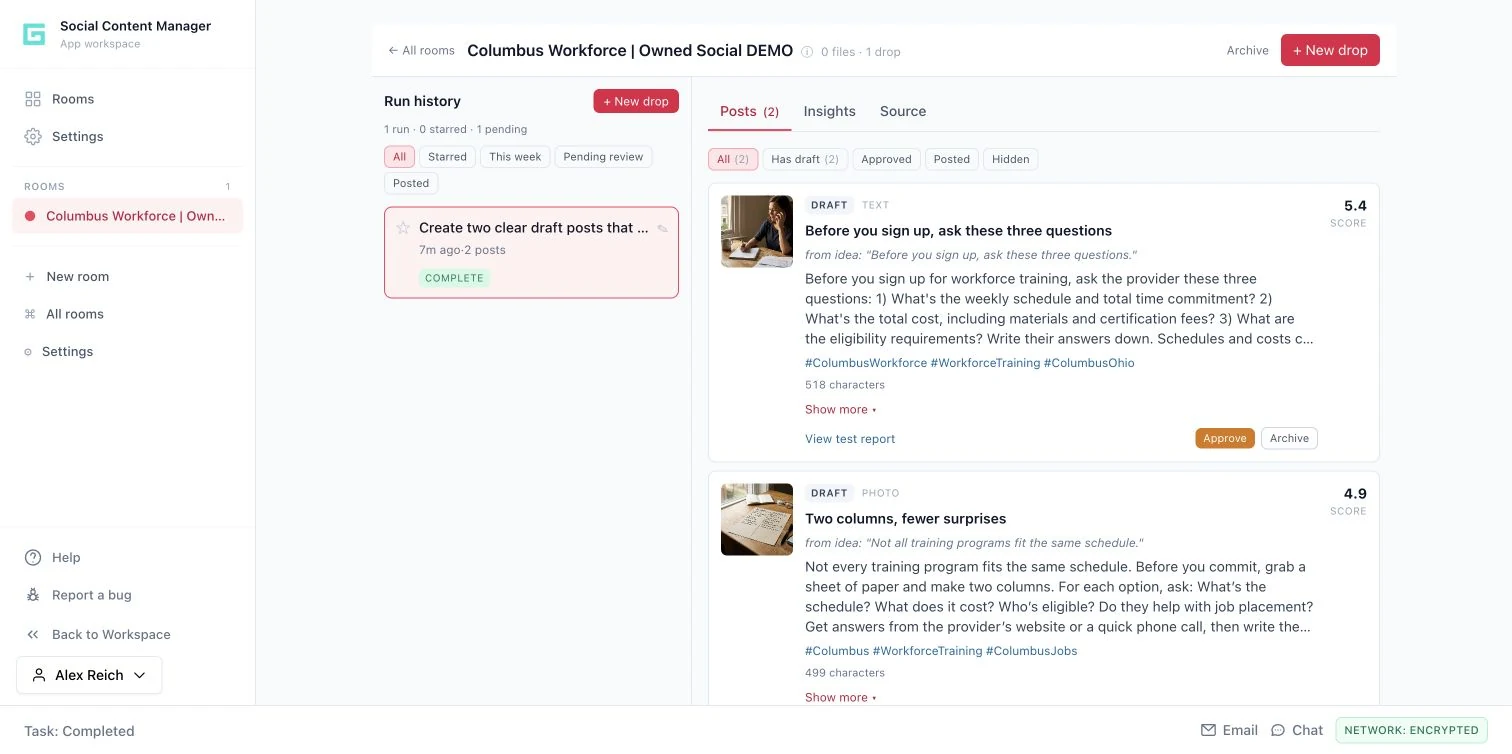
15 SECONDS / INSIDE THE WORKFLOW
Keep the context for each content destination close to its ideas, copy, images and editorial decisions.
Guided product walkthrough using actual demo screens. Silent, with on-screen explanations.
Group the destination and its run history in one editorial workspace.
Read the proposed copy and inspect the accompanying creative before approval.
Approve a draft or archive it, then handle posting through your usual channels.
THE FULL WORKFLOW / EXPLORE EACH STEP
Create a room for the destination. Add page notes, voice examples, files and relevant Workspace references. Capture the audience context and the kind of useful content the page should provide.
A reusable destination brief and a separate content history.
THE REVIEWUse approved reference material and a clear voice. Confirm that any factual claims in the source material are still current.
Add a prompt or source drop for the next piece of work. The workflow develops possible angles from the room's context. Keep the task concrete: explain one practical question, clarify the next step or prepare a short series from an approved brief.
A set of proposed content ideas tied to the run.
THE REVIEWChoose ideas for their relevance and factual basis. An attractive angle still needs to match what the organization can say.
Where synthetic testing is used, review modeled reactions and suggestions to identify possible confusion. Consider why an idea may need more detail or a different explanation before turning it into a draft.
Idea feedback and a clearer reason for which concepts the team develops.
THE REVIEWSynthetic scores are exploration aids, not audience research or a forecast of engagement.
Develop the selected ideas into post copy and images. Inspect the words and visual claims, revise the draft and use the available version history when a previous caption or image is preferable.
Editable post drafts with copy, assets and editorial history.
THE REVIEWCheck claims, dates, links, accessibility, tone and image suitability. Generated images are not documentary proof of an event or relationship.
Approve the material in the content workflow, then copy or download it for the destination's publishing process. Record the manual posting status when the team has actually posted it, so the editorial queue reflects what happened.
Reviewed content ready for manual posting and a record of its editorial state.
THE REVIEWApproval inside the app is not automatic publication. Verify the final post and its live destination before recording it as posted.
HYPOTHETICAL WORKED EXAMPLE
WHAT IT DOES / WHY IT MATTERS
Stores page notes, voice examples, files, workspace references and a separate run history.
Reduce repeated briefing while keeping each destination distinct.
Generates angles, optionally tests a synthetic panel and composes leading ideas into copy and images.
Give reviewers a structured starting point and likely objections.
Approves drafts, supports copy/download, records manual posting, and restores caption or image versions.
See what needs review and preserve useful creative decisions.
Post copy, images, idea scores, test reports and editorial history.
Uses workspace references and the Message Testing engine; copy/download transfers content to external destinations.
YOUR NEXT PRIORITY
Explore how your objective could move through research, message development and practical execution.
Request a demo Download the overview ↓